|
The Browser is the first screen you see when you start up AccuChef. It
displays the recipes in the currently opened cookbook in alphabetical name order
(by default).
|
|
|
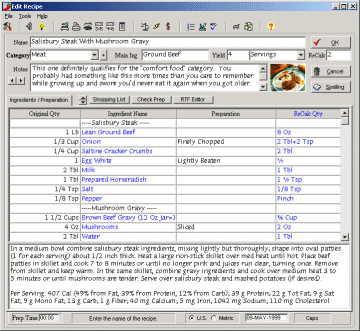
The Editor is where you can edit existing recipes, type in new recipes
or enter your search criteria. AccuChef doesn't use separate screens
for each function so it's very simple to use.
|
|
|
The Previewer allows you to see what your printed output is going to look
like. It's also allows for an easy way to change the fonts and font sizes
of your printed reports.
|
|
|
The Nutritional Analyzer uses the US Department of Agriculture's
SR28 database of over 10,700 items to analyze your recipes.
|
|
|
The Shopping List Manager allows you to build your shopping list from the
recipe(s) you're preparing or type in your own items.
|
|
|
The Spell Checker lets you check your spelling and learns as you use it.
|







 $19.95