|
The
Browser
is the first screen you see when you start up AccuChef. It
displays
the recipes in the currently opened cookbook in alphabetical name order
(by default). |
|
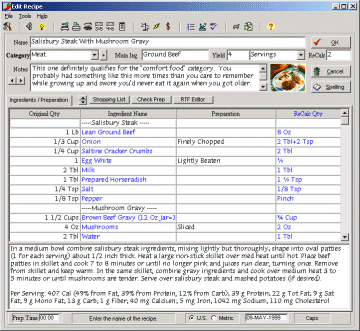
The Editor
is where
you can edit existing recipes, type in new recipes or enter your search
criteria. AccuChef doesn't use separate screens for each function
so it's very simple to use. |
|
The Previewer
allows
you to see what your printed output is going to look like. It's
also
allows for an easy way to change the fonts and font sizes of your
printed
reports. |
|
The Nutritional
Analyzer
uses the US Department of Agriculture's SR16-1 database of over 6,300
items
to analyze your recipes. |
|
The Shopping
List Manager
allows you to build your shopping list from the recipe(s) you're
preparing
or type in your own items. |
|
The Spell
Checker
lets you check your spelling and learns as you use it. |







 $19.95
US
$19.95
US